
Showing posts with label Android. Show all posts

Thursday, 16 July 2015

Syncing your Samsung smartphone to Microsoft Outlook


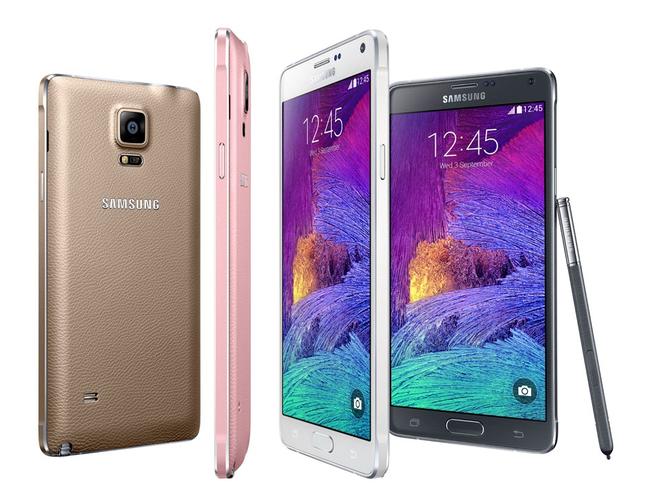
I recently upgraded from an HTC One X Android smartphone, to a brand new Samsung Galaxy Note 4 Android smartphone.

Before Android, I had a Windows phone and before that, many versions of PalmPilot. I've used Microsoft Outlook for 20+ years with a variety of different email accounts, and for the last 10 years a standard Gmail account. With both the Windows phone and Palm, I could sync easily my Outlook Calendar, Contacts, Tasks and Notes to whatever device I was using, for free. All that changed when I went Android (which I love in every other respect, except this).

Once I got my first HTC Desire in 2010, I suddenly found that the only way to sync using the provided HTC Sync Manager software was via USB cable, but it would only sync Outlook's Calendar and Contacts. I've worked around that by finding other apps such as Evernote to handle Tasks and Notes. (It also repeatedly attempted to suck every image and music file from my PC onto the phone, which I fought on an ongoing basis, but I digress).

My biggest (only) reservation about moving to Samsung hardware was their crappy sync software, Samsung Kies. I tried helping a friend set this up for her Samsung a year or so ago - it worked for a week and then came up with a random error message - when we Googled that message, there were 40-odd pages of people reporting the same error - AND NO FIX. A simple Google search reveals the extent of the horror that is this software, so that was never going to happen.

You'd think if you had a Microsoft PC with Outlook, a standard Gmail account and an Android phone, syncing the Calendar, Contacts and Tasks from PC to phone should be easy, right? Nope...

My desktop PC is a rather old Windows 7 64-bit. Back in 2010 I thought I could just sync my Outlook calendar into Gmail, then sync the phone to that. Nope. Google and Microsoft do not want to play nicely so you can't do that with a simple Gmail account - even now, you need to have Google Apps for Work, Education, or Government. You can't even buy this software - instead you have to upgrade your Google account to a paid version.

As I refused to consider using Samsung Kies, that made a direct USB <-> phone sync tricky.

The only option was third-party software. Unfortunately, I tried this back in the HTC days and some of the third-party apps install their own Calendar and Contacts apps onto the phone, but other apps look for the default calendar and contacts apps. Then Gmail didn't like what Outlook was serving up and dropped data... it was awful.

Anyway - the good news is, for the last month I've been testing AkrutoSync and it seems to be working beautifully. It automatically syncs any Calendar, Contact, Task or Note I add to either PC or phone, via wi-fi and almost immediately, and I don't lose any data in the sync process. The data goes into the default Samsung S-Planner, S-Notes and Contacts apps on the phone, and into the correct Outlook folders on the PC.

There are only 2 downsides to this software and they're fairly minor for me, but may be deal-breakers for others. First, AkrutoSync is only for Samsungs, which unfortunately rules out HTC if I ever decide to return there.

Second, to make this work, it is necessary to create a Microsoft Exchange Active Server account on the Samsung, and all the "phone" data is within that account. The problem is that if I want to invite anybody to a meeting request, it comes from that account and not from my "real" email address. The workaround is to only send meeting requests from Outlook. Having Tasks and Notes back on my Android smartphone though, makes that little glitch worthwhile for me!

** Update 2 September 2015**
Have recently discovered another issue. AkrutoSync takes port 80 on your PC and this port number cannot be changed. As a web developer, I have run WAMP for many years on my PC, configured by default to port 80. While I can change WAMP to use a different port, it means going through every setting and bookmark and manually changing them all to reflect the new port - a big job. Skype also uses port 80 by default, but Skype allows you to change to another port so this was a relatively simple fix. AkrutoSync needs an option to change the port away from the default to avoid conflicts. Currently I need to shut down AkrutoSync to do my web development work.

Share:

Friday, 30 August 2013

What I'm running on my Android, take 2

I previously blogged about this when I got my first Android back in 2010, the HTC Desire, which was the first Android smartphone. Best phone I'd ever had... until I got my current one! I've been meaning to update this for a while because a few friends have gone Android, so here goes.

The current list isn't much different from the old one. Most changes are either because newer apps came out that did the job better, or the new phone/new Android version includes those things by default so I don't need to install them any more. I won't link them all but if you search Google Play you'll be able to find them pretty easily:
  • The very first thing you absolutely should get is Swype. Trust me, it will change your life. :) Instead of poking/tapping away at that tiny little keyboard - Swype. Awesome. If you have a Samsung it may already be installed on your phone but you might need to set it as the default keyboard. If it's not installed, try searching for the trial version first but honestly... it will be the best 99c you spend today.
  • All the default "social" apps such as Facebook, Google+, LinkedIn, Flickr, Instagram, Blogger, Pinterest, etc.
  • TweetCaster for Twitter - I find this much better than the default Twitter app.
  • ColorNote Notepad Notes for quick on-the-spot notes (still can't find anything to sync with Outlook Notes though)
  • Dropbox (share files betwen PC and phone)
  • Springpad - I moved all my Outlook Tasks & Notes here after I gave up trying to find a way to sync them from Outlook to Android. Microsoft and Google just flat-out refuse to play ball. (You may prefer Evernote which is the most popular app in this area, but I wanted something I could access without a data connection and Evernote makes you pay for that privilege). I go by the idea that Dropbox is for file sharing, Springpad is for notes/list sharing. My husband and I have a couple of shared folders which is really useful.
  • ES File Explorer (I used to use OI File Manager which is also good but this one includes Dropbox etc.)
  • KeePassDroid (also install KeePass on PC, data file in Dropbox - always up-to-date password manager *wheee* geek-heaven!)
  • Key Ring (let's you store all those store cards)
  • Moon+ Reader - the best ebook reader I've found, it reads just about every file format.
  • QuickPic - I like this better than the standard Android Gallery, it's faster.
  • Silent Time Lite - lets you configure the phone to automatically go to Silent mode at certain times - I have a "Night" event which makes it all go silent at 9pm each night.There are a bunch of different ways to achieve this functionality now but I've had this one since 2010 so.. why change? :/
  • SMS Backup+ - love this, and you can't do this on an iPhone. Sends a copy of every SMS you send/receive to your email.
  • Weather Australia and Aussie Weather Radar - useful when at the footy to see if rain is coming!
  • A bunch of system apps including Advanced Task Killer, Clean Master, Juice Defender (helps manage battery life, although Android Jelly Bean includes this functionality), MyBackupPro (worth paying for, especially if you've rooted your phone, it backs up EVERYTHING - still backs up a lot if you haven't rooted).
  • Chrome and Firefox, still not sure which one I prefer, syncing bookmarks from my desktop PC isn't seamless in either.
  • Multimedia-style apps such as Shazam (must-have), HoytsAU, Foxtel Guide (handy if you have IQ and want to record something when you're out), etc..
  • Footy-related apps - AFL, Hawthorn, footytips.
  • Travel-related apps - Train Trapper (for Melbourne trains) - I personally think it's better than the official Metlink app,TripCase - my husband and I both use this for travel itineraries, an app called Airport to look up flight times, etc.
  • Google Translate - very useful on my recent South American trip.
  • TunnelBear (also have this on my PC) - free VPN, 500Mb data per month, you can pay for more.
  • eBay, Gumtree, Amazon AppStore (for the things you can't get in Google Play), a bunch of games and a bunch of other stuff I won't bother listing because it's not that interesting. :)
What apps are your must-haves? I'm always looking for new ideas :)

Edit 17-Sep-2013:
  • iSyncr - syncs your music, playlists, etc. from iTunes onto your Android device. I'm watching my favourite iTunes playlists sync via WiFi as I type! There's a trial version which lasts for 14 days and lets you sync up to 100 songs per playlist, and then it's US$3.99 to buy a full version. "Awesome" doesn't even start to cover this!

Share:

Tuesday, 23 November 2010

What I'm running on my Android

LOVE my HTC Desire!  A few people have asked what apps I have - here's the latest list (I can't be bothered trying to link them, just search the names in Android Market and you'll find them easily enough):
Apps
  • Facebook for Android
  • TweetCaster for Twitter (allows multiple Twitter accounts)
  • ColorNote Notepad Notes (still can't find anything to sync with Outlook Notes)
  • Dropbox (lets me share files betwen PC and phone)
  • KeePassDroid (have KeePass installed on PC and data file in Dropbox - always up-to-date password manager *wheee* geek-heaven!)
  • Google Maps / Google Sky Map / Google Goggles / Street View on Google
  • TinyShark (plays Grooveshark for free)
  • OI File Manager
  • Airplane Toggle / Wifi Toggle / Silent Toggle / Bluetooth Toggle Widgets (from Droidmania - good for quick access on-screen)
  • GPS Toggle Widget (SchreinerDev)
  • Silent Time Lite - lets you configure the phone to automatically go to Silent mode at certain times - I have a "Night" event which makes it all go silent at 10pm each night.
  • SMS Backup - absolutely the best thing ever.  Sends a copy of every SMS you send/receive to your email.
  • Aussie Weather Radar
  • Footy Scoreboard
  • Ashes Cricket Live Score
  • Barcode Scanner (scans QR codes)
  • Unit Converter - Convertpad
  • Adobe Photoshop Express
  • Live Drive (Think Nimble)
  • Bookmarks manager
Games
  • Angry Birds
  • Angry Birds Seasons
  • Jewels
  • Solitaire
  • Real BlackJack
  • Mahjong
  • Sudoko Free
What I still need
A successful, easy, FREE way of syncing Outlook Tasks and Outlook Notes to the Android.  C'mon Microsoft and Google, TALK dammit.  If anybody knows a good way to do this please let me know.

For a review of my Telstra-branded HTC Desire that I posted on a Telstra message board recently, please click here.
Share:

Friday, 19 November 2010

Review on my Telstra HTC Desire (Android)

Originally posted here
 
I've had my Telstra HTC Desire for 4 months now, after using a variety of smartphones (a new one almost every year) for the last 6-7 years. While it's one of the best phones I've ever had, there are 2 glaring issues which, if I'd known about them beforehand, probably would have made me second-guess this purchase:

1. Despite the fact that it's supposed to be fully a customisable device, Telstra have hard-coded it so that it is impossible to remove any Telstra-specific apps that you don't want. There is NO way to delete those Telstra apps, which largely do not work if you are using Wi-Fi anyway. This is despite a sales-rep in a Telstra shop assuring me that they COULD be removed. The only way to get rid of them is to flash the ROM with a generic Android ROM, which is a little daunting for most people and apparently voids the warranty anyway. I could understand Telstra putting their own things in, but to make them unremovable makes the whole concept of Android a bit of a joke, and makes we wish I'd bought a generic handset from overseas instead.

2. HTC Sync, to sync between Outlook and the Desire using a cable, is a complete and utter disaster of an application. I acknowledge that this isn't a Telstra issue, it's an HTC/Google issue. Coming from a WinMobile device where I could sync Calendar, Contacts, Tasks and Notes easily, it was a shock to discover that I can NOT sync Tasks or Notes. Further, the sync randomly randomly corrupts my Outlook contacts each time I sync (and yes, I've tried 3 different versions of HTC Sync). As a result I've done one sync and then turned it off for Contacts, then fixed up all the corrupt entries in Outlook, and now only sync my Calendar. The only thing that makes me dream about my WinMobile days, quite honestly!

Cheers,
Nicky
Share:

Archive